When your coding agent hits its usage limit, pocket moves it to your next key.
Your own keys, in your OS keychain. Runs on your machine. Every switch names the model now answering.
$ npm i -g @zerwone/pocket
$ pocket setup
$ claude-pocket
npm: @zerwone/pocket · needs Node.js 20+ and Claude Code or Codex CLI · release notes
pocket is a free, open-source command-line tool that keeps Claude Code and Codex working when they hit a usage limit or rate limit (HTTP 429). It runs a small router on your own machine. When your current provider refuses a request for quota, it resends it to the next API key you configured (Groq, NVIDIA, OpenRouter, Cerebras, or your Anthropic or OpenAI key) and tells you which model is now answering.
How it works
claude-pocket ──► pocket (127.0.0.1:3460, on your machine)
                    │
                    ├─► 1. your Anthropic / OpenAI key   ← first, if you have one
                    │      429 "usage limit"? ──┐
                    ├─► 2. Groq        (free)  ◄┘  next key with quota left
                    ├─► 3. NVIDIA      (free)
                    ├─► 4. OpenRouter  (free)
                    └─► 5. Cerebras    (free)
- You start your agent through pocket (
claude-pocketinstead ofclaude). It looks and works exactly the same. - Every request goes to pocket first, which sends it to the first key in your order that has quota left.
- When that key answers "limit reached" (HTTP 429), pocket sends the same request to the next key, mid-session, without a restart.
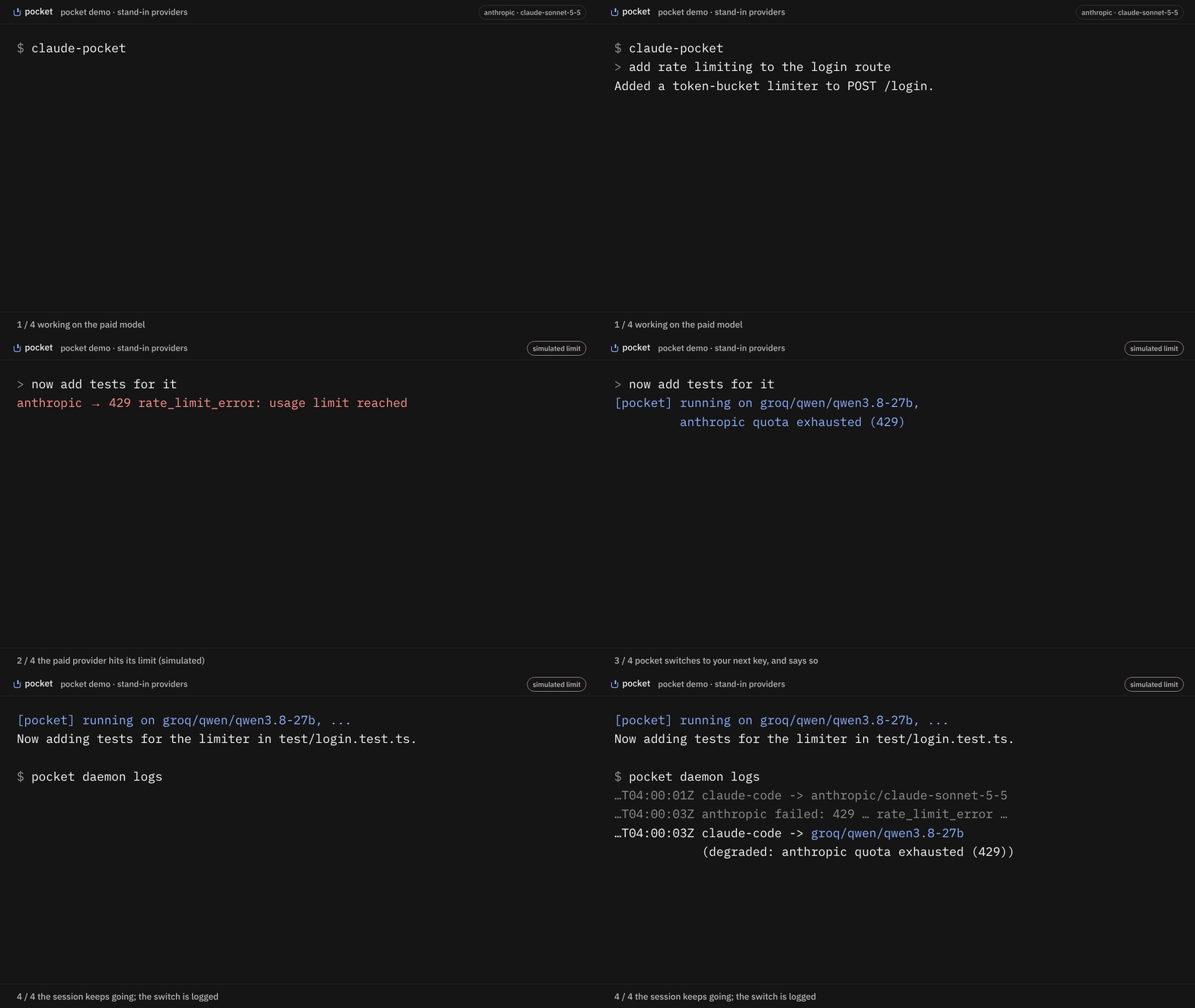
- The next reply starts with one line saying which model is answering now.
- pocket reads each provider's live model list, so it uses models that exist for your key today and skips retired ones on its own.
Install @zerwone/pocket. Do not run npx pocket: that name on npm belongs to someone else.
Use it
1. Install (npm):
$ npm i -g @zerwone/pocket
2. Set it up once. pocket setup finds Claude Code and Codex, walks you through free keys from Groq, NVIDIA, OpenRouter and Cerebras (with the signup link for each; skip any you don't want), optionally adds your paid key (used first, up to $10 a day), and connects your agents.
$ pocket setup
3. Start your agent through pocket, from your project folder. Plain claude and codex keep working as before.
$ cd my-project
$ claude-pocket     # instead of: claude
$ codex-pocket      # instead of: codex
4. Work as usual. Nothing changes until a key runs out. Then the next reply starts with:
[pocket] running on groq/openai/gpt-oss-120b, anthropic quota exhausted (429)
and the session carries on, as long as the next key has quota left. The fallback model may handle the task differently or worse, so review what it does. When every key is spent, the agent stops as it would without pocket.
5. Check on it any time:
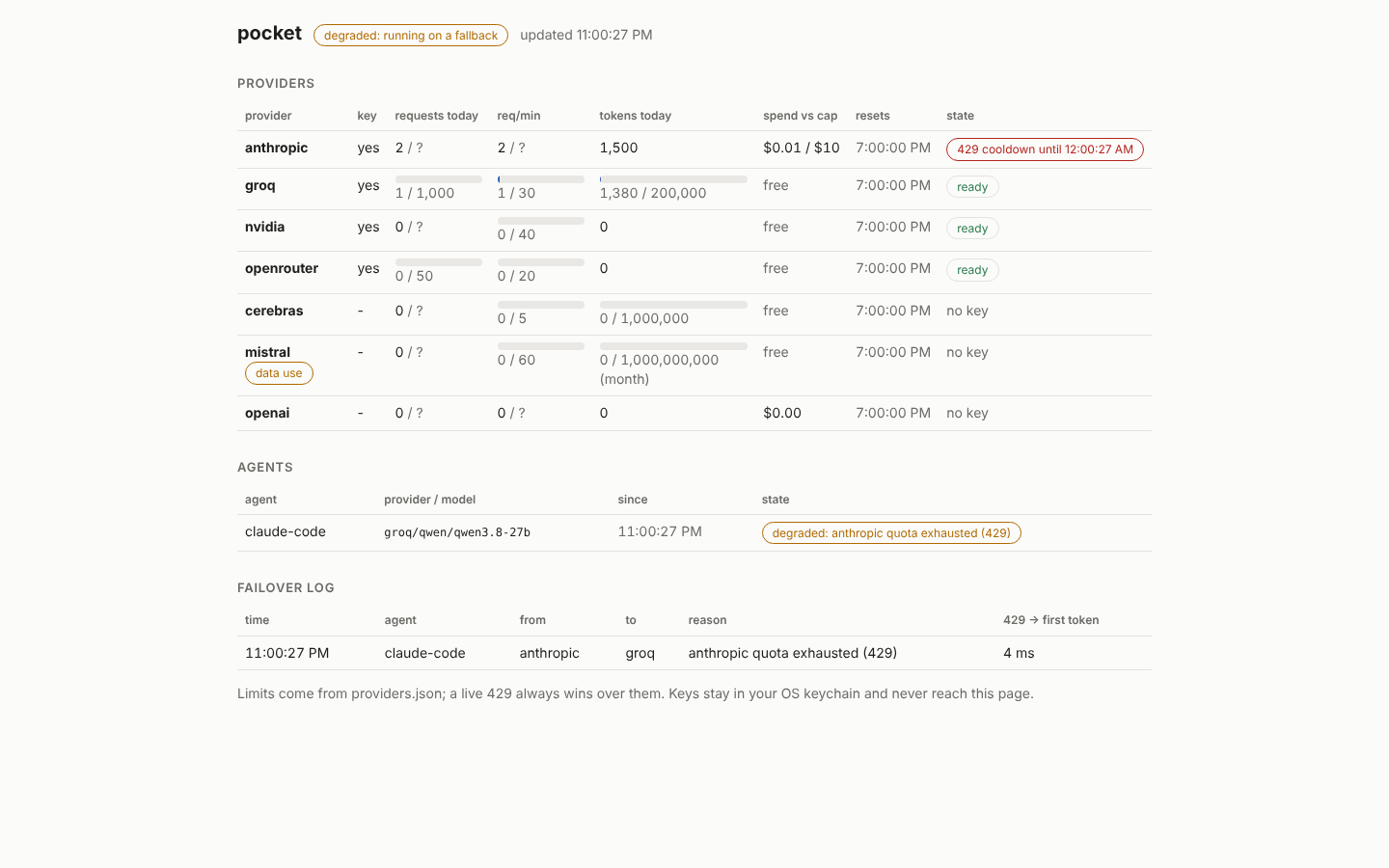
$ pocket dash              # quota per key, spend, every switch
$ pocket models --refresh  # which model each provider will use now
$ pocket doctor            # something off? start here
6. Undo: pocket detach claude (or codex) puts your config back exactly as it was. Update: pocket daemon stop, then npm i -g @zerwone/pocket@latest.
With a Claude Pro or Max plan
Work with plain claude (or the Claude desktop app) on your plan. When the plan hits its limit, run claude-pocket in the same project folder and keep going on your keys. Your files carry over; the conversation doesn't, so save a short handoff note as CLAUDE.md in the project first. Claude Code reads it when it starts.
How much free you get
| Provider | Free per key | Get a key |
|---|---|---|
| Groq | 1,000 requests/day | console.groq.com/keys |
| NVIDIA | ~40 requests/min | build.nvidia.com |
| OpenRouter | 50 requests/day (1,000 after a one-time $10 top-up) | openrouter.ai/settings/keys |
| Cerebras | 1M tokens/day, 5 requests/min | cloud.cerebras.ai |
Checked against each provider's docs on 2026-11-08. Mistral (1B tokens/month) is supported but off by default, because its free plan may use your requests for training.
How it handles your keys
- Your keys only. Each provider only ever sees the key you gave it for that provider. Nothing is pooled or shared. Your requests go to the provider you configured.
- No pocket account, no telemetry. You still need an account with each provider.
- OS keychain, not pocket's config files. Windows Credential Manager, macOS Keychain, or Secret Service on Linux.
- Local only. Listens on
127.0.0.1and refuses anything without its local token.
Works with Claude Code (CLI and VS Code) and Codex CLI. Cursor partly: chat with your own key only, not Agent or Composer. Windows, macOS, Linux.
Troubleshooting
pocket: Claude Code is not installed: install Claude Code from code.claude.com/docs/en/setup, open a new terminal, checkclaude --version. The Claude desktop app doesn't install theclaudecommand.npm warn cleanup ... EPERMwhile updating: the daemon was running.pocket daemon stop, then install again.404installing a version released minutes ago: npm needs a few minutes before a new version downloads. Try again shortly.- The agent keeps retrying with an error from pocket: run
pocket daemon logsand look at thefailed:lines, then open an issue with them. They contain no keys.
FAQ
What can I do when Claude Code says "usage limit reached"?
Four options: wait for the limit to reset; switch Claude Code to a paid Anthropic API key; route Claude Code through one gateway such as OpenRouter; or run it through pocket, which tries your own keys from several providers in order and switches automatically, mid-session, without restarting.
Does pocket work with a Claude Pro or Max subscription?
claude-pocket runs Claude Code on API keys through pocket, not on your subscription login. Keep using claude on your plan. When the plan hits its limit, start claude-pocket and keep working on your keys.
How is pocket different from OpenRouter, LiteLLM or claude-code-fallback?
OpenRouter is one provider and gateway; pocket can use an OpenRouter key as one step in its order. LiteLLM is a general proxy you configure yourself. claude-code-fallback moves you from a Claude subscription to Anthropic API billing only. pocket is narrower: one pocket setup, keys in your OS keychain, a quota meter per key, launchers for Claude Code and Codex, and a notice in the session each time it switches.
Which model answers after a switch?
The first provider in your order with quota left (by default Groq, then NVIDIA, OpenRouter and Cerebras), and on it the best model its live model list offers your key right now, matched to what the agent asked for. pocket reads each provider's list itself, so a retired or no-longer-free model is skipped automatically. The reply names the provider and model; pocket models shows what it will pick.
Is it free? Is it allowed?
pocket is MIT-licensed. The free allowance comes from each provider's own free tier on your own account. pocket never pools or shares keys. Read each provider's terms; Mistral's free plan may train on your requests, so it is off by default.
Does my code leave my machine?
Your requests go to the provider you configured, the same as using that provider directly. pocket itself has no server, no account and no telemetry.
Does it work on Windows?
Yes. Keys go to Windows Credential Manager, the launchers are .cmd files, and the test suite runs on Windows, macOS and Linux on every change.